




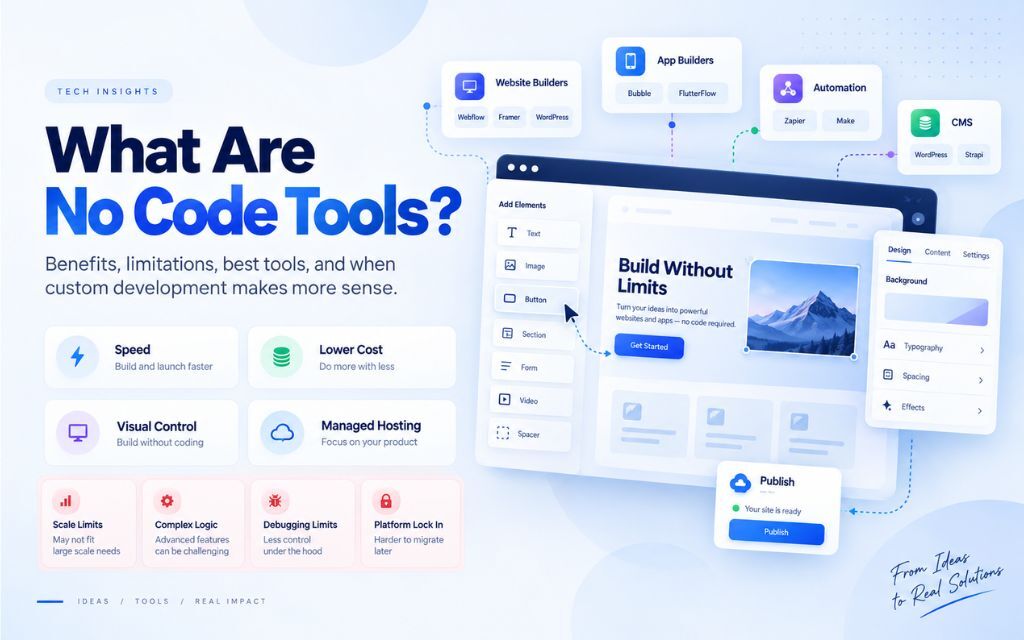
No-code tools are software platforms that let you build websites, apps, and automated workflows using visual drag-and-drop interfaces instead of writing code. They’re built for speed and accessibility, which makes them ideal for simple projects, but they run into real limits around complex logic, performance at scale, and long-term flexibility.
That’s the short version. Here’s everything else you need to know before you commit a project, a budget, or a launch date to one.
What Are No-Code Tools?
No-code tools are platforms that let people build functional websites, applications, and automated workflows without writing traditional programming code. Instead of typing syntax, users assemble pre-built visual components (buttons, forms, database fields, logic blocks) on a canvas, and the platform converts those visual choices into working software behind the scenes.
The category includes several different types of tools, and they’re not all solving the same problem:
- Website builders (Webflow, Framer) focus on visual design and content publishing.
- App builders (Bubble, Adalo) focus on interactive, database-driven applications.
- Automation platforms (Zapier, Make) focus on connecting existing apps and moving data between them.
- CMS platforms with visual editors (WordPress with page builders) sit somewhere in between, combining content management with visual layout tools.
The common thread across all of them: you’re trading direct control over code for speed, accessibility, and a managed environment that handles the technical infrastructure for you.
How Do No-Code Tools Actually Work?
No-code platforms work by translating visual actions into functional code behind the scenes. When you drag a button onto a canvas, set a color, or connect a workflow step, the platform generates the underlying HTML, CSS, JavaScript, or backend logic automatically, so you never see or touch it directly.
Most no-code platforms are built on three core layers:
- A visual editor, where you design the interface by placing and styling elements directly on the page.
- A logic or workflow layer, where you define what happens when a user takes an action (submits a form, clicks a button, signs up) using conditional rules instead of written code.
- A hosting and infrastructure layer, managed entirely by the platform, covering servers, security patches, uptime, and scaling within the platform’s own limits.
This is exactly why these tools feel so fast to use, and exactly why they eventually hit a ceiling. The visual and logic layers can only express what the platform’s designers anticipated you’d need. Anything outside that scope requires a workaround, a third-party integration, or custom code.
Benefits of No-Code Tools
The core benefits of no-code tools are speed, lower cost, visual design control, and managed hosting. They let non-technical users launch functional products in hours instead of months, without hiring a developer or managing server infrastructure.
Speed
Traditional development follows a linear cycle: requirements, design, build, test, deploy. Even a modest project can take six to twelve weeks. No-code tools compress that dramatically. You can go from a blank canvas to a live landing page or working app prototype in a single day. That speed matters most when you’re validating whether an idea has real demand before investing further.
Cost
Hiring a developer, even a freelancer, typically costs several hundred to several thousand dollars for a basic build, before ongoing maintenance. No-code tools let you build and launch the first version yourself, preserving budget for growth activities instead of development. This is particularly valuable for small internal tools (intake forms, booking calendars, inventory trackers) that would never justify a dedicated development budget.
Visual design control
No-code builders show you the result of every change instantly. There’s no compiling, no refresh, no gap between action and outcome. This makes the tools accessible to people who think visually rather than in code syntax, letting a designer with a strong eye produce polished results without touching CSS.
Managed hosting
No-code platforms handle servers, SSL certificates, security patching, and uptime as part of the subscription. You’re not responsible for infrastructure, which removes one of the most common sources of small business security incidents: unpatched, self-managed servers.
Limitations of No-Code Tools {#limitations}
The main limitations of no-code tools are difficulty handling complex or custom logic, rising costs and slower performance at scale, limited debugging visibility, and platform lock-in that makes migrating to another system difficult.
Complex logic
No-code platforms are built around common, predictable patterns: blogs, marketplaces, booking systems. When a project needs custom pricing logic, multi-step conditional approval flows, or real-time data reconciliation across multiple systems, the visual builder starts to strain. Workarounds accumulate, one on top of another, until the “simple” no-code solution has more fragile moving parts than custom code would have had from the start.
Scaling limits
No-code pricing usually scales with usage: number of users, data volume, workflow executions per month. As traffic grows, so does the bill, often steeply. Performance can also degrade, since the abstraction layer between the visual builder and the underlying infrastructure adds overhead that custom-built systems don’t carry.
Limited debugging
When something breaks in custom code, a developer can trace the exact line responsible. No-code platforms abstract that process away. A failed workflow or a broken data sync often comes with a vague error message and no way to inspect what actually happened, leaving founders to troubleshoot by trial and error or wait on platform support.
Platform lock-in
Data, design elements, and business logic built inside a proprietary no-code platform don’t transfer cleanly to another system. Migrating later frequently means manually rebuilding the product feature by feature rather than performing a simple export and import. This is the risk most commonly discovered only after it becomes expensive.
Best No-Code Tools Compared {#tools-compared}
The most widely used no-code tools include Bubble for interactive web apps, Webflow for custom-designed websites, WordPress for content-driven sites with a large plugin ecosystem, and Framer for fast, animation-rich marketing pages. Each is built for a different type of project, and choosing the wrong one for your use case is the most common cause of no-code frustration.
| Tool | Best For | Key Strength | Main Limitation |
| Bubble | Interactive web apps, MVPs, marketplaces | Handles genuinely complex logic (conditionals, API calls, databases) without code | Workflow canvas becomes hard to manage and debug as the app grows |
| Webflow | Custom-designed marketing and business websites | Clean, semantic code output; strong visual design control | Requires understanding of web layout concepts (breakpoints, flexbox/grid); limited app logic |
| WordPress | Content-driven sites, blogs, small e-commerce | Massive plugin ecosystem covers almost any feature | Plugin conflicts and updates can cause instability and slowdowns as the site grows |
| Framer | Marketing pages, portfolios, landing pages | Sleek, fast, animation-heavy design with minimal effort | Not built for data-heavy applications or complex backend logic |
Bubble
Bubble is the most capable general-purpose no-code app builder on the market. Its visual workflow editor supports genuine logic: conditionals, API integrations, and database operations, making it a strong choice for building a functional MVP with real interactivity. The tradeoff shows up as the app grows: the same workflow canvas that’s manageable with a handful of features becomes difficult to navigate and debug with dozens of interconnected ones, and performance can suffer on data-heavy applications.
Webflow
Webflow isn’t an app builder. It’s a visual website builder that produces clean, professional output, better suited to custom marketing sites and business websites than to interactive applications. Getting real value from it still requires understanding fundamental web layout concepts, since you’re manipulating them visually rather than avoiding them entirely. It has light CMS and interaction capabilities but limited support for complex logic or user account systems.
WordPress
WordPress’s plugin ecosystem can cover nearly any feature request, which is exactly why it remains the most widely used platform on the web. That same flexibility is its biggest liability: each plugin is independently maintained code that can conflict with others, and heavily customized WordPress sites are prone to gradual slowdowns and update-related breakage as more plugins accumulate.
Framer
Framer specializes in one thing: fast, visually striking marketing pages and portfolios. It’s not designed for heavy data handling or complex backend logic, and forcing an application-style project into Framer usually means fighting against the tool rather than working with it.
No-Code vs. Low-Code vs. Custom Development {#comparison}
No-code requires zero programming knowledge and uses fully visual interfaces; low-code combines visual tools with the option to write custom code for advanced functionality; custom development is built entirely with code, offering full control over logic, performance, and scalability at the cost of higher time and budget investment.
| Factor | No-Code | Low-Code | Custom Development |
| Technical skill required | None | Some coding knowledge helpful | Full development expertise |
| Speed to launch | Fastest | Fast | Slowest |
| Cost to start | Lowest | Moderate | Highest |
| Handling complex logic | Limited | Better, but still constrained | Full control |
| Performance at scale | Can degrade | Better than no-code | Optimized for scale |
| Long-term flexibility | Lowest (platform lock-in) | Moderate | Highest |
| Best for | MVPs, internal tools, simple sites | Growing products needing some customization | Complex, high-traffic, or highly custom products |
How to Choose the Right No-Code Tool {#how-to-choose}
Choosing the right no-code tool depends on your project’s complexity, expected growth, tolerance for downtime, and whether you have a plan for migrating off the platform if you outgrow it. Matching the tool to the actual shape of your project prevents most of the common frustrations no-code users report.
Ask these questions before committing:
- Is your logic simple and predictable, or does it involve unusual conditional branches? Straightforward if-this-then-that logic fits no-code well. Layers of exceptions push you toward custom code.
- Do you expect meaningful growth in the next year or two? Early-stage validation favors no-code. Confirmed growth or funding favors planning for scale from the start.
- How much does downtime or a bug actually cost you? Low-stakes projects can tolerate the limited debugging visibility of no-code. Revenue-critical systems benefit from the full visibility custom code provides.
- Do you have a realistic plan for what happens if you outgrow the platform? If not, treat any no-code build as a prototype rather than a permanent foundation.
When You Need a Developer Instead of a No-Code Tool {#when-to-hire-a-developer}
You need a developer instead of a no-code tool when your project requires complex custom logic, needs to handle significant scale or traffic, involves sensitive data with strict security requirements, or needs deep integrations that no-code platforms can’t support natively. These are the situations where the constraints of a visual builder cost more time and money than building with code from the start.
Common signals it’s time to bring in a developer:
- You’re stacking multiple workarounds or third-party tools just to replicate a feature that should be simple.
- Your no-code costs are climbing faster than your revenue as usage grows.
- You’ve hit a wall trying to debug a recurring issue with no visibility into the cause.
- Your business depends on data security, compliance, or performance guarantees a no-code platform can’t commit to.
- You’re planning a long-term product, not a short-term test.
The Hybrid Approach: No-Code Now, Custom Code Later {#hybrid-approach}
A hybrid approach uses no-code tools to validate an idea quickly and cheaply, then transitions the proven concept to custom development for scalability, performance, and long-term flexibility. This sequencing captures the speed advantage of no-code without inheriting its long-term limitations.
In practice, this means launching a no-code MVP to get real users and real feedback first. Once the idea is validated and you know which features actually matter, based on real usage rather than assumptions, that’s the point to rebuild the core product on infrastructure that can scale cleanly. This isn’t a failure of the no-code phase. It’s using each approach for what it does best: no-code for speed and validation, custom development for durability and growth.
Frequently Asked Questions
No-code tools are used to build websites, mobile apps, internal business tools, and automated workflows without writing programming code. Common use cases include landing pages, MVPs, booking systems, internal dashboards, and workflow automation between existing software tools.
No-code tools are good for validating a business idea, launching an MVP, or running simple internal operations. They become less suitable as a business scales, since complex logic, high traffic, and long-term flexibility needs typically outgrow what visual builders can support efficiently.
No-code requires no programming knowledge at all and relies entirely on visual interfaces. Low-code also uses visual tools but allows developers to add custom code for functionality the visual builder can’t handle, offering more flexibility than no-code while remaining faster than fully custom development.
No-code tools can handle high traffic, but often at rising cost and with potential performance tradeoffs, since most platforms price based on usage and add processing overhead compared to custom-built infrastructure. Businesses expecting significant growth often plan an eventual migration to custom code.
Bubble is one of the most capable no-code tools for building interactive web applications, supporting real logic like conditionals, API calls, and database operations. It’s well suited to MVPs and functional prototypes, though very complex apps can become difficult to manage and debug as they grow within the platform.
Webflow is considered a no-code website builder, focused on custom visual design for websites rather than application development. It produces clean, professional code output but has limited support for complex application logic compared to a dedicated app-building platform.
Outgrowing a no-code platform typically means migrating your data, design, and business logic to a new system, which is rarely a simple export and import. Most migrations require manually rebuilding features on the new platform or in custom code, which is why planning an exit strategy in advance is important.
Most no-code tools are designed to require no programming knowledge, though a basic understanding of concepts like layout, data structure, or web design principles makes the results significantly better. Some tools, like Webflow, still require familiarity with web layout fundamentals even without writing code.
Hire a developer instead of using a no-code tool when your project needs complex custom logic, has to handle significant scale, involves sensitive data, or requires integrations that no-code platforms can’t natively support. Long-term products with serious growth plans generally benefit from custom development sooner rather than later.