




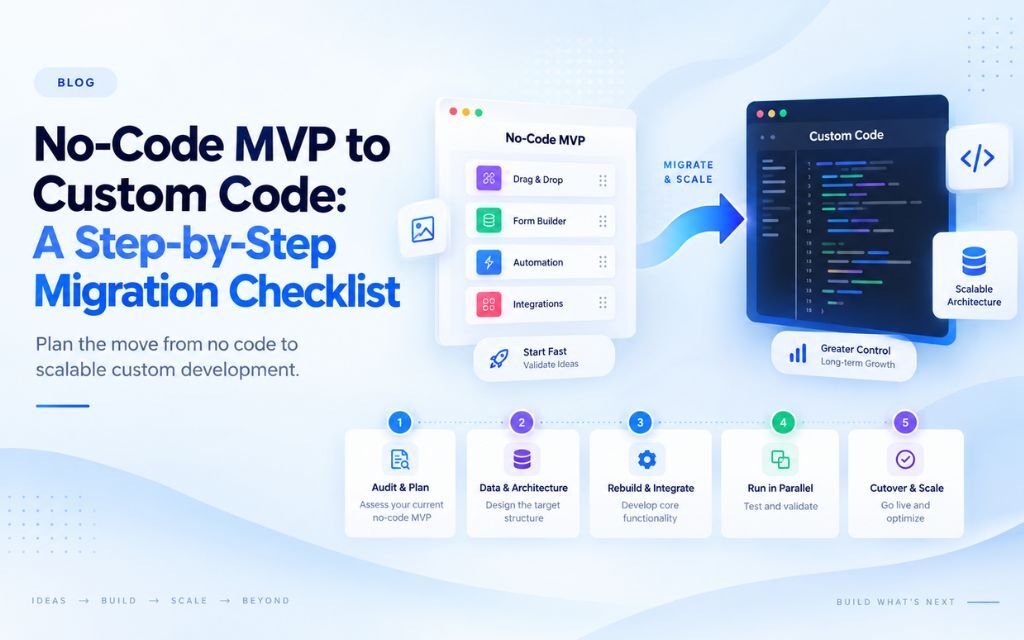
Migrating a no-code MVP to custom code involves auditing what’s actually working, documenting your data structure and business logic, prioritizing which features to rebuild first, choosing an architecture that supports growth, and running both systems in parallel before fully switching over. A phased migration is almost always lower risk than a full rebuild done all at once.
If you’ve validated your idea on a no-code platform and you’re ready to move to custom development, the biggest risk isn’t the migration itself. It’s doing it without a plan. Here’s the checklist to work through before you write a single line of production code.
Why Migration Planning Matters More Than the Rebuild
The biggest risks in a no-code to custom code migration come from poor planning, not from the technical rebuild itself, since most failed migrations lose data, break existing user workflows, or run over budget due to skipped documentation steps. A no-code platform hides a surprising amount of implicit structure and logic behind its visual interface, and skipping the work of writing that logic down before migrating is the single most common cause of migration problems.
Treat this less like “moving a website” and more like “translating a system you’ve never fully documented into a new language.” The translation only goes smoothly if you understand what you’re translating first.
Step 1: Audit What’s Actually Working
Start by identifying which features are causing genuine friction (cost, performance, debugging difficulty) and which are working fine as-is, since not every part of your MVP necessarily needs to be rebuilt. Pull usage data, support tickets, and platform cost breakdowns to find your highest-friction areas objectively, rather than relying on gut feeling about what “feels slow” or “feels fragile.”
This step often reveals that only 20 to 30 percent of a product’s features are actually causing the pain that triggered the migration decision in the first place. Rebuilding everything when only a handful of features need it wastes both time and budget.
Step 2: Document Your Data Structure
Before writing any new code, fully document your existing database structure, including every field, data type, and relationship between records, since this becomes the blueprint for your new database schema. No-code platforms manage data relationships visually, which means this structure often exists only inside the platform’s interface and nowhere else in writing.
Export a full schema map: what data exists, how it’s connected, what’s required versus optional, and any validation rules currently enforced by the platform. Missing this step is one of the most common causes of data integrity problems after migration.
Step 3: Document Your Business Logic and Workflows
Write out every conditional rule, automation, and workflow currently running in your no-code platform in plain language before attempting to recreate it in code, since visual workflows don’t automatically translate into readable specifications. This includes edge cases and exceptions that may have been added over time and are easy to forget even though they matter to real users.
A useful method: go through every user-facing action in your product (sign up, checkout, submit a form) and write out exactly what happens behind the scenes for each one, step by step, including every conditional branch. This becomes your functional specification for the development team.
Step 4: Prioritize Features by Impact and Risk
Rank features for migration based on a combination of how much friction they’re currently causing and how risky they are to rebuild, prioritizing high-friction, lower-risk features first to build early momentum and confidence in the new system. Trying to migrate your most complex, highest-risk feature first is a common mistake that stalls migrations and erodes confidence in the process.
| Priority | Friction Level | Rebuild Risk | Action |
| Migrate first | High | Low | Quick wins that reduce pain fast |
| Migrate second | High | High | Plan carefully, allocate more time and testing |
| Migrate later | Low | Low | Low urgency, can wait |
| Reconsider entirely | Low | High | May not be worth rebuilding at all right now |
Step 5: Choose an Architecture Built for Growth
Select a technical architecture based on your expected scale and complexity over the next two to three years, not just what’s needed to replicate current functionality, since under-building the new system risks repeating the same outgrowing problem later. This is the point where it’s worth involving experienced developers who can evaluate tradeoffs between different frameworks, database choices, and hosting approaches based on your specific growth expectations.
Common considerations at this stage include expected user volume, data complexity, integration requirements with other systems, and whether the product needs to support features like real-time updates, complex permissions, or heavy reporting that a no-code platform struggled with.
Step 6: Rebuild in Phases, Not All at Once
Rebuild the highest-priority features first while keeping the rest of the product running on the existing no-code platform, rather than attempting a full simultaneous rebuild of the entire product. A phased approach reduces risk significantly, since it limits how much can go wrong at once and allows real user feedback on each rebuilt feature before moving to the next.
This also spreads development cost over a longer period rather than requiring a large upfront investment before any value is delivered, which makes budgeting and stakeholder buy-in considerably easier to manage.
Step 7: Run Both Systems in Parallel
Before fully retiring the no-code platform, run the new custom-built components alongside the existing system for a defined testing period to confirm they handle real usage correctly under real conditions. This parallel period is where subtle bugs, missed edge cases, and data discrepancies typically surface, and it’s far cheaper to catch them here than after a full cutover.
A reasonable parallel period is typically two to six weeks depending on product complexity and usage volume, long enough to see real usage patterns but not so long that it delays the migration indefinitely.
Step 8: Migrate Data Without Losing History
Migrate historical data carefully, preserving timestamps, relationships, and record history rather than only transferring current-state data, since losing historical data can break reporting, customer trust, and any features that depend on past activity. Data migration should be tested on a copy of production data first, never directly on live data, to catch formatting or mapping errors before they affect real users.
Build a rollback plan for the data migration specifically. If something goes wrong during the transfer, you need a clear way to restore the previous state without permanently losing information.
Step 9: Plan the Cutover and Rollback Path
Plan the final cutover to the new system with a clear rollback path in case something goes wrong, including a defined decision point for when to abandon the cutover and revert to the no-code platform temporarily. Migrations that succeed tend to have this decided in advance, rather than being figured out under pressure during a live incident.
Communicate the cutover timeline to your team and, where relevant, to customers, especially if any downtime or temporary feature limitations are expected during the transition window.
Migration Checklist Summary
- [ ] Audit which features are causing genuine friction versus working fine as-is
- [ ] Document the full data structure, including relationships and validation rules
- [ ] Write out all business logic and workflows in plain language, including edge cases
- [ ] Prioritize features by friction level and rebuild risk
- [ ] Choose an architecture sized for two to three years of expected growth
- [ ] Rebuild in phases, starting with high-friction, lower-risk features
- [ ] Run new and old systems in parallel before full cutover
- [ ] Migrate historical data carefully, with a tested rollback plan
- [ ] Set a clear cutover date with a defined rollback decision point
Frequently Asked Questions
Migration timelines vary widely based on product complexity, but a phased migration for a moderately complex MVP typically takes two to six months, spread across prioritized feature rebuilds rather than a single all-at-once project.
No, a phased migration that rebuilds high-friction features first while keeping the rest of the product running on the existing platform is generally lower risk and easier to budget for than a full simultaneous rebuild.
The biggest risk is incomplete documentation of existing data structure and business logic before starting the rebuild, since no-code platforms hide this structure inside a visual interface, and missing details commonly cause data integrity or functionality problems after migration.
Yes, running the no-code platform alongside newly built custom components during a parallel testing period is a standard part of a low-risk migration process, allowing you to confirm the new system works correctly before fully retiring the old one.
Prioritize features that are causing the most friction, such as high cost, poor performance, or frequent bugs, while also considering how risky each feature is to rebuild, starting with high-friction, lower-risk items to build early momentum.
Hiring an experienced developer or development team is strongly recommended for this type of migration, since architecture decisions made early have long-term consequences, and mistakes in data migration or business logic translation can be costly to fix after launch.
A migration like this goes a lot smoother with an experienced set of eyes on the plan before development starts. Share where your MVP currently lives, what’s been causing friction, and roughly how complex your data and workflows are, and it’s usually possible to map out a realistic, phased path from your current no-code build to a custom foundation that can actually grow with you.