




Most businesses waste more time on repetitive internal work than they realize. Approvals sit in inboxes. Data gets copied between systems by hand. Reports that could run automatically would take someone an hour every Friday morning. AI process automation is the practical answer to all of that, and in 2026, it has moved well past the experimental stage.
This guide covers what AI process automation actually is, where it creates the most value, how startups and enterprises approach it differently, and what it takes to implement it without burning your budget.
What Is AI Process Automation?
AI process automation means using artificial intelligence to handle tasks that previously required human attention, decision-making, or repetitive effort. It goes further than traditional rule-based automation, which can only follow fixed instructions. AI-powered systems can read unstructured data, interpret context, make judgment calls within defined parameters, and improve over time.
Here is a simple way to see the difference: a traditional automation script routes every invoice above $5,000 to a manager. An AI-powered system reads the invoice, checks it against historical patterns, flags anomalies, and routes it with a confidence score attached. The output is smarter, not just faster.
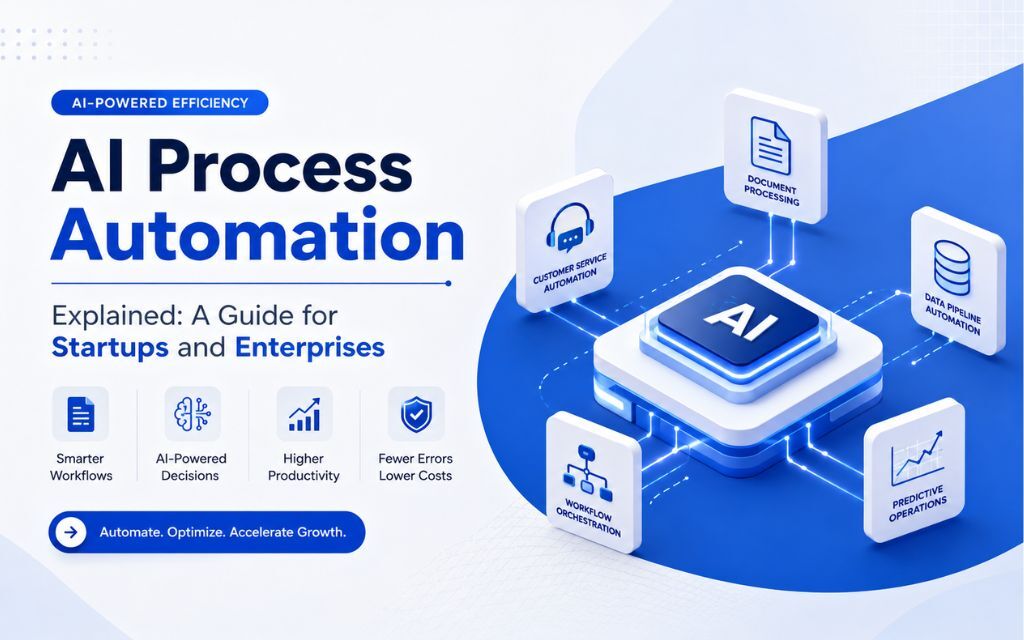
Common AI process automation categories include:
- Document processing — extracting, classifying, and routing data from invoices, contracts, and forms
- Customer service automation — AI agents and chatbots that handle tier-1 support without human intervention
- Data pipeline automation — moving, cleaning, and transforming data between systems without manual effort
- Workflow orchestration — triggering multi-step processes based on real-time signals rather than scheduled jobs
- Predictive operations — using historical data to anticipate demand, flag risks, or schedule maintenance before problems occur
Why 2026 Is a Turning Point
Three things converged to make AI process automation genuinely accessible this year.
Large language models got cheaper and faster. Running inference on GPT-4-class models now costs a fraction of what it did two years ago, which makes embedding AI into internal workflows economically viable even for teams with modest budgets.
The tooling matured. Platforms like GitHub Copilot, Cursor, and Amazon Q make it faster to build custom automation logic. No-code tools like v0.app, Builder.io, and Lovable.dev mean a lean product team can prototype automation workflows without a full engineering team behind them.
And the business case became hard to ignore. Companies that automated core processes earlier are compounding those gains now. Teams that are not watching their operational costs stay flat while competitors move faster.
Where AI Process Automation Creates Real Value
For Startups
If you are a seed-to-Series-B company, your constraint is not ambition — it is time and headcount. AI process automation lets a small team do work that previously required a larger one.
The highest-value targets for startups are usually:
- Onboarding flows — automating user verification, welcome sequences, and account setup steps
- Support triage — routing tickets, generating draft responses, and resolving common queries without a human in the loop
- Sales and CRM hygiene — auto-enriching lead records, logging activity, and triggering follow-up sequences
- Reporting — generating weekly metrics summaries from raw data instead of having someone compile them manually
Automate those four areas, and you can realistically recover 10 to 20 hours of team time per week. At a burn rate of $15,000 to $30,000 per month in salaries, that is not a small number.
For Enterprises
Mid-market and enterprise teams face a different problem. The processes exist. The data exists. But the systems do not talk to each other, and the workflows were designed for a world before AI.
High-impact enterprise automation targets include:
- Document-heavy compliance workflows — contract review, audit trail generation, regulatory reporting
- Supply chain monitoring — AI watching inventory, supplier signals, and demand forecasts in parallel
- IT operations — automated incident detection, root cause analysis, and ticket resolution
- HR and employee operations — onboarding task management, policy Q&A bots, performance data aggregation
The challenge at enterprise scale is integration. Your automation layer needs to connect to legacy systems, respect data governance rules, and produce outputs that humans can audit. That is where custom development consistently outperforms off-the-shelf tools.
How to Choose the Right Approach
There is no single right answer between buying a platform, building custom automation, or combining both. The decision comes down to three things: how standard your processes are, how sensitive your data is, and how fast you need results.
| Situation | Recommended Approach |
| Standard process, low sensitivity | Off-the-shelf tool (Zapier, Make, etc.) |
| Standard process, high data sensitivity | Hosted platform with custom configuration |
| Non-standard process, moderate complexity | Custom build with AI tooling |
| Complex, multi-system, regulated environment | Custom build with full lifecycle ownership |
Most startups start with off-the-shelf tools and hit a ceiling within 12 months. The processes that matter most to your business are rarely standard. That is when a custom AI integration becomes the right investment.
What a Real AI Process Automation Build Looks Like
Building a custom AI automation system is not a 12-month project anymore. With AI-assisted development tools like Cursor and GitHub Copilot embedded at every stage, teams can compress that timeline significantly.
A typical engagement covers:
- Discovery — mapping the current process, identifying the highest-value automation targets, and defining measurable success criteria
- Design — building the data model, defining the AI decision logic, and designing the interfaces your team will actually use
- Build — writing the integration layer, configuring the AI components, and connecting to your existing systems
- QA — testing edge cases, validating AI outputs against expected behavior, and stress-testing before go-live
- Deployment — shipping to production on cloud infrastructure (AWS is a common choice for its reliability and scalability) with monitoring in place from day one
The difference between a team that ships this in 2 to 3 months versus 8 to 12 months is almost always the development process, not the complexity of the problem.
Common Mistakes to Avoid
Automating a broken process. If the underlying workflow is inefficient, automating it just makes the inefficiency faster. Fix the process logic first.
Skipping the audit trail. AI systems make decisions. Your team needs to see why. Build logging and explainability in from the start — especially in regulated industries.
Over-automating too early. Start with one high-value process. Prove the ROI. Then expand. Trying to automate everything at once usually results in nothing working well.
Treating AI as a black box. You need to understand what your system is doing and why. That means working with tools and partners who can explain their outputs, not just produce them.
Underestimating integration complexity. Connecting AI automation to legacy systems takes longer than building the AI itself. Budget for it upfront.
Building vs. Buying in 2026
The build-versus-buy question is more nuanced than it used to be. Off-the-shelf automation platforms are genuinely good for standard use cases. But they have real limits: you pay per seat or per task at scale, you cannot customize the AI logic, and your competitive advantage is identical to that of every other company using the same tool.
Custom AI automation built on your own stack gives you a system that fits your specific process, runs on your data, and does not have a per-transaction cost ceiling. The upfront investment is higher. The long-term economics often favor it.
The right question is not “can I buy this?” but “does a generic tool give me the outcome I actually need, or does my process require something specific?”
If you are building, the quality of your development partner matters as much as the technology. A team that uses AI tooling to accelerate their own build process will deliver faster and at lower cost than one that does not. AvyaTech builds AI integrations and custom automation systems for startups and enterprises, using tools like Cursor, GitHub Copilot, and Amazon Q to cut build time without cutting corners.
Measuring Success
Define your success metrics before you build, not after. The right metrics depend on what you are automating, but a useful starting framework includes:
- Time saved per week — how many hours does this remove from your team’s plate?
- Error rate reduction — how does AI accuracy compare to the manual baseline?
- Cost per transaction — what does it cost to process one unit of work before and after?
- Cycle time — how long does the process take from start to finish?
Set a baseline, run the automation for 30 days, and measure against it. If the numbers do not move, you have either automated the wrong thing or the implementation needs work.
FAQs
AI process automation uses artificial intelligence to handle tasks that previously required human effort, judgment, or repetitive manual work. Unlike rule-based automation, AI systems can interpret unstructured data, adapt to context, and improve over time.
Traditional robotic process automation follows fixed rules and breaks when inputs change. AI process automation handles variability, reads unstructured inputs like documents or emails, and makes context-aware decisions within defined parameters.
Document processing, customer support triage, data pipeline management, workflow orchestration, and predictive analytics are among the highest-value targets. The best candidates are high-volume, time-consuming processes that follow a recognizable pattern even when the inputs vary.
With modern AI-assisted development tools, a focused custom automation project can ship in 2 to 4 months. Traditional timelines of 6 to 12 months are increasingly unnecessary when the right tooling and process are in place.
Start with off-the-shelf tools for standard processes. When your process is non-standard, your data is sensitive, or you need tight integration with existing systems, a custom build usually delivers better long-term economics and a more precise fit.
Costs vary depending on complexity, integration requirements, and development approach. A focused startup automation project might start around $30,000. Enterprise-grade systems with multiple integrations and custom AI logic typically run from $100,000 upward.
Measure time saved per week, error rate reduction, cost per transaction, and process cycle time. Set a baseline before you build, run the system for 30 days post-launch, and compare the numbers directly.