




Artificial Intelligence is transforming software development. But one question many teams still ask is:
Can AI actually speed up real product development?
At Avya Technology, we decided to test this ourselves.
Instead of debating the idea, we built a working AI-powered discussion forum using modern AI development tools.
The goal was simple:
Create a platform where users can ask questions, start discussions, and get AI-assisted responses within the conversation.
You can explore the demo here: https://community.avdemosites.com/
Purpose
The goal was to build a real web application using AI as a core part of the development workflow and understand how much it can reduce development time in a practical scenario.
Instead of building the app the traditional way, we used AI at every step — from generating the UI to writing backend logic.
This helped us cut down repetitive work and significantly speed up the process. What would typically take weeks was completed in just a couple of days.
The idea wasn’t just to build faster, but to understand how AI can practically transform real-world development workflows.
Here’s how the entire build process worked.
The AI Tools We Used
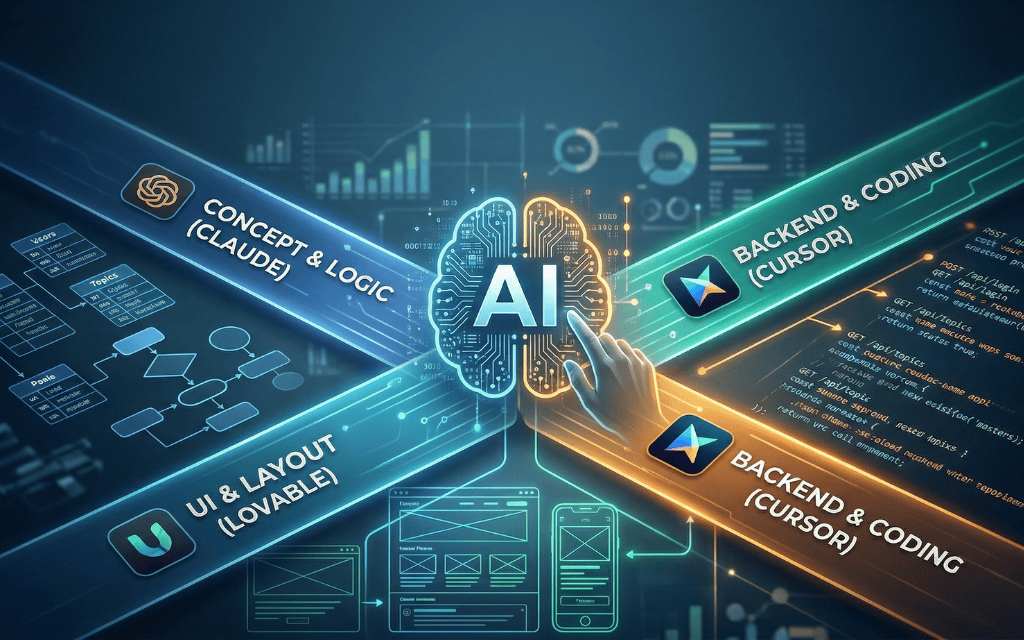
To build the application, we used three AI tools at different stages of development.
| Tool | Purpose |
| Lovable | Generate the initial UI structure and app layout |
| Cursor | AI-assisted coding and backend development |
| Claude | Planning database structure and development logic |
Each tool played a different role in helping us move faster.
Step 1: From Idea to Interface in Minutes
Every product starts with an idea.
Our idea was simple:
Build a discussion forum where AI helps users find answers faster.
Traditionally, the next step would be designing wireframes and UI layouts.
Instead, we used Lovable to generate the initial application interface.
We described the application in a prompt:
Create a discussion forum with:
- Topic listing page
- Discussion thread page
- Reply section
- AI assistant panel
- Responsive layout
Within minutes, the tool generated the basic structure of the application, including navigation and page layouts.
This allowed us to move directly into development.
To achieve the desired results with Loveable, meticulous prompt crafting was crucial. We focused on:
Being specific and providing ample context, giving clear instructions and defining the purpose, assigning proper tasks and roles, and defining the expected output and markers.
import { useState, useMemo } from 'react';
import { DiscussionCard } from '@/components/Discussion/DiscussionCard';
import { SearchAndFilters } from '@/components/Discussion/SearchAndFilters';
import { Button } from '@/components/ui/button';
import { mockDiscussions } from '@/data/mockData';

const ITEMS_PER_PAGE = 10;

interface IndexProps {
  user?: {
    name: string;
    email: string;
  } | null;
}

const Index = ({ user }: IndexProps) => {
  const [searchTerm, setSearchTerm] = useState('');
  const [selectedTopic, setSelectedTopic] = useState('All Topics');
  const [sortBy, setSortBy] = useState('newest');
  const [currentPage, setCurrentPage] = useState(1);
Step 2: Structuring the Application Data
Once the interface was ready, we needed a way to store discussions and user activity.
For this step, we used Claude AI to help design the database structure.
A forum application only needs a few core entities.
Example tables:
Users
| Column Name | Data Type | Key | Description |
| id | BIGINT | Primary Key | Unique identifier for each user |
| name | VARCHAR(100) | — | Full name of the user |
| VARCHAR(150) | Unique | Email address of the user | |
| password | VARCHAR(255) | — | Encrypted/hashed user password |
| created_at | TIMESTAMP | — | Record creation timestamp |
| updated_at | TIMESTAMP | — | Last update timestamp |
Topics
| Column Name | Data Type | Key | Description |
| id | BIGINT | Primary Key | Unique identifier for each topic |
| title | VARCHAR(255) | — | Title of the discussion topic |
| description | TEXT | — | Detailed description of the topic |
| user_id | BIGINT | Foreign Key | References the user who created the topic |
| created_at | TIMESTAMP | — | Topic creation timestamp |
| updated_at | TIMESTAMP | — | Last update timestamp |
Posts
| Column Name | Data Type | Key | Description |
| id | BIGINT | Primary Key | Unique identifier for each post |
| topic_id | BIGINT | Foreign Key | References the related topic |
| user_id | BIGINT | Foreign Key | User who created the post |
| content | TEXT | — | Main discussion content |
| created_at | TIMESTAMP | — | Post creation timestamp |
| updated_at | TIMESTAMP | — | Last update timestamp |
Replies Table
| Column Name | Data Type | Key | Description |
| id | BIGINT | Primary Key | Unique identifier for each reply |
| post_id | BIGINT | Foreign Key | References the related post |
| user_id | BIGINT | Foreign Key | User who replied |
| reply_text | TEXT | — | Reply message content |
| created_at | TIMESTAMP | — | Reply creation timestamp |
| updated_at | TIMESTAMP | — | Last update timestamp |
Step 3: Building the Backend Faster with AI
Next came the application logic.
For development, we used Cursor, an AI-powered code editor that helps generate and improve code.
Instead of writing every API manually, the AI assistant helped generate the core endpoints.
Example API routes:
POST /api/register
POST /api/login
GET /api/topics
POST /api/create-topic
POST /api/reply
GET /api/topic/{id}
These APIs handle the key actions of the forum such as:
- user authentication
- topic creation
- posting replies
- loading discussions
Developers still review and refine the code, but AI speeds up the initial implementation.
Step 4: Adding AI Into the Discussion
The most exciting feature of the platform is AI-assisted responses.
When a user posts a question, the system can send that question to an AI model and generate a suggested reply.
Example request:
POST /api/ai-reply
Example payload:
{
 "question": "How does Laravel authentication work?"
}
AI returns a response such as:
{
 "reply": "Laravel authentication works using guards and providers..."
}
The user can then review, edit, or post the AI-generated answer in the discussion thread.
This creates a collaborative experience between humans and AI.
Step 5: Deploying the Application
After testing the application, we deployed it to a cloud environment.
The final stack includes:
| Component | Description |
| Frontend | Modern JavaScript interface |
| Backend | API-based application |
| Database | Relational database system |
| Cloud hosting | Scalable server infrastructure |
Once deployed, the forum works like any normal online platform.
Try the AI Discussion Forum
If you’re curious about the result, you can explore the demo here:
https://community.avdemosites.com/
https://www.avyatech.com/discussion-forum-with-ai/
This project is just one example of how AI can assist in building smarter applications. At Avya Technology, we continue to experiment with new technologies that help teams build faster and innovate more efficiently.