




Seven out of ten shoppers who add something to their WooCommerce cart never finish paying for it. Sit with that number for a second. Every rupee spent on ads, SEO, or influencer content is pushing traffic toward a page that loses most of it right before the sale closes.
That’s the real problem behind WooCommerce optimization. Store owners spend months getting product pages right and traffic flowing, then watch the majority of that effort evaporate at checkout. This guide covers what’s driving the drop-off in 2026 and the specific fixes that bring shoppers back to finish what they started.
For stores where checkout problems are tied to theme performance, payment setup, or custom functionality, hiring an experienced WooCommerce developer can help fix the technical issues behind the drop-off.
Why Shoppers Abandon Your WooCommerce Checkout
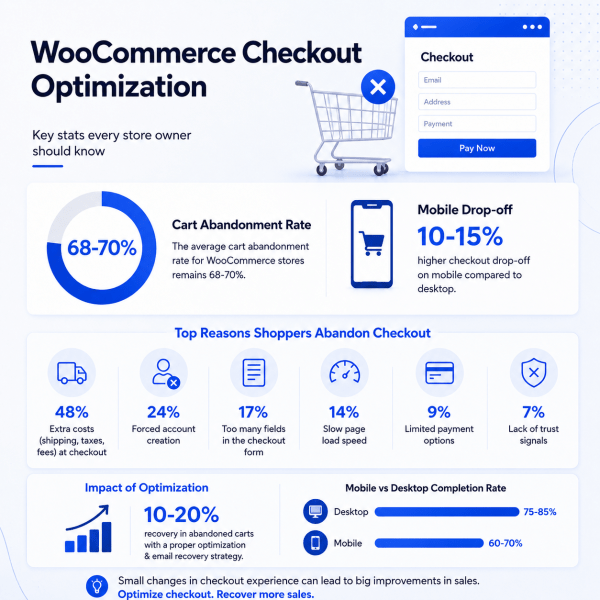
Cart abandonment across WooCommerce stores has held steady around 68 to 70 percent for years now. What’s shifted is where it’s concentrated. Mobile checkout drop-off runs 10 to 15 percentage points higher than desktop on most stores, because the default WooCommerce checkout was built for a laptop screen and nobody’s gotten around to fixing that.
A handful of reasons keep showing up when you actually dig into the data.
Unexpected costs at the final step top the list. Shipping fees, taxes, or handling charges that only appear on the last page create a kind of surprise that kills trust instantly. Shoppers don’t mind paying for shipping, generally. They mind finding out about it after they’ve already mentally committed to buying.
Forced account creation is still one of the fastest ways to lose a sale, especially from someone buying for the first time who just wants to try your product once without setting up a login they’ll never use again.
Then there’s the form itself. The default WooCommerce checkout ships with more fields than most stores need. Company name, address line two, phone confirmation, all of it adds friction for very little payoff.
Slow page load matters more here than almost anywhere else on your site. Checkout is dynamic, so it can’t be cached the way a blog post or a product listing can. If your hosting or theme is carrying extra weight, checkout is where that weight shows up, right when the customer has the least patience for it.
And limited payment choice sends people away quietly. A shopper who wants UPI, Apple Pay, or a buy-now-pay-later option and doesn’t see it will often just close the tab instead of digging out a credit card.
None of these are exotic problems. Every one of them is fixable inside a WooCommerce admin panel in an afternoon.
7 WooCommerce Checkout Optimization Best Practices for 2026
1. Turn On Guest Checkout
Go to WooCommerce, then Settings, then Accounts and Privacy, and check the box that lets customers order without creating an account.
This one toggle recovers a surprising share of abandoned checkouts, particularly from mobile shoppers and first-timers who arrived from an ad and have zero loyalty to your brand yet.
You can still collect emails through a post-purchase account prompt or a newsletter checkbox. Just don’t make account creation the price of entry for paying you.
2. Cut Your Checkout Fields Down to the Essentials
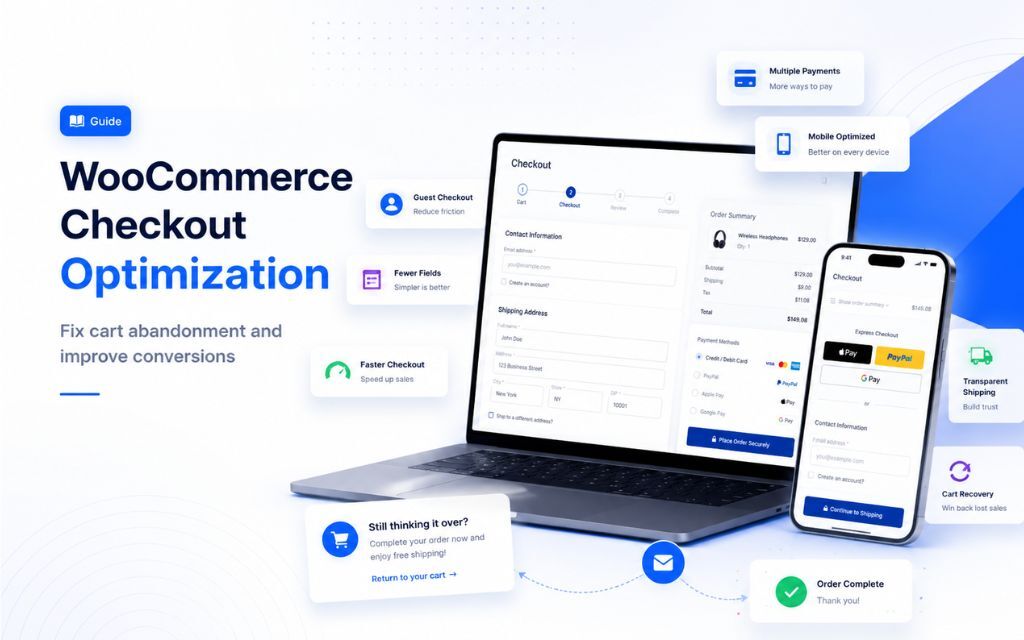
Open your checkout page right now and count the fields. Most default WooCommerce setups ask for more than the order actually needs. Email, shipping address, and payment details cover the core.
Everything else, phone number, company name, that second address line, should be optional or hidden unless your business genuinely needs it, like B2B stores collecting GST numbers or billing details.
The WooCommerce Checkout Field Editor plugin turns this into a five-minute job. Every field you drop reduces the chance someone stalls out and leaves.
3. Show Shipping and Tax Costs Before the Final Step
Sticker shock at the payment page is one of the most preventable reasons people abandon carts. Add a shipping estimate to the product page or cart page.
If you offer free shipping above a threshold, make that threshold visible everywhere, something like a running line showing how much more a shopper needs to add before shipping is free. Customers who can see the full cost early tend to follow through, because nothing unpleasant is waiting at the end.
4. Fix Checkout Page Speed
A checkout that takes more than three or four seconds starts bleeding shoppers, and on mobile the patience is even shorter. Because checkout content is dynamic, ordinary page caching won’t help.
What actually helps: object caching through Redis, a lightweight WooCommerce-friendly theme, and dequeuing scripts from plugins that load on every single page whether checkout needs them or not.
Run your checkout URL through Google PageSpeed Insights. A score under 90 usually points to unused JavaScript or an oversized image sitting on a page that shouldn’t need either.
5. Offer More Ways to Pay, Including Installments
Stores offering three or more payment methods convert noticeably better than stores stuck on one. This lives under WooCommerce, then Settings, then Payments. For anything priced above roughly $50, or the rupee equivalent, adding an installment option through something like Razorpay, or Klarna and Afterpay for stores selling abroad, gives price-sensitive shoppers a reason to finish the purchase instead of bookmarking it and forgetting about it entirely.
6. Put Trust Signals Right Next to the Payment Button
The moment someone is about to type in their card number is the moment they’re most nervous about the whole transaction.
A small secure checkout badge, one line about your return policy near the pay button, recognizable payment logos, Visa, Mastercard, UPI, PayPal, all of it does quiet work.
None of it needs a developer. It’s the gap between a checkout that feels like a random WordPress install and one that feels like a business worth trusting with a card number.
7. Build an Abandoned Cart Recovery Sequence
Even a well-optimized checkout still loses some shoppers, and that’s fine, because this is where recovery earns its keep. A short email sequence, an immediate reminder, a follow-up with a small incentive after 24 hours, and a final nudge around 72 hours typically recover somewhere between 10 and 20 percent of abandoned carts.
CartFlows or a native WooCommerce abandoned cart tool handles this without much setup. Keep discounts out of the first email. Save the incentive for the second or third message, or shoppers learn to abandon on purpose because they know a coupon is coming.
Mobile Checkout: The Part Most Stores Still Get Wrong
Mobile traffic makes up most visits to WooCommerce stores now, yet checkout is still frequently designed and tested on a laptop screen. A few adjustments matter more here than anywhere else in your optimization work.
Put express payment options like UPI, Apple Pay, and Google Pay above the email field, not below it. A returning customer should be able to pay in one tap without touching a keyboard.
Collapse the order summary into a single expandable line on mobile instead of leaving it open and pushing the payment form below the fold. Something like “Show order summary, ₹2,499” that expands on tap keeps the form visible without giving up the reassurance of seeing the total.
Remove duplicate fields entirely. Skip the email confirmation field. Don’t make someone retype a saved address. Every repeated field barely registers on a desktop and gets felt immediately on a small screen.
Test on an actual phone. Not Chrome’s device emulator. Safari on iOS handles autofill and keyboard behavior differently enough that emulated testing misses real problems.
How to Tell If Your Optimization Is Actually Working
Most WooCommerce store owners skip the one metric that matters most here: checkout completion rate broken down by device. Not overall conversion rate, but specifically what share of people who start checkout on a phone actually finish it, compared to desktop. Combine your analytics tool with WooCommerce’s own order data, or use a plugin like MonsterInsights or Metorik that segments checkout funnels by device.
If mobile completion is well behind desktop, more traffic won’t close that gap. Only checkout changes will. It’s also worth segmenting abandonment by traffic source. If paid social visitors bail more than organic search visitors, the real issue might sit upstream in audience mismatch rather than anything wrong with the checkout itself.
A Five-Step Starting Checklist
Enable guest checkout under Accounts and Privacy. Audit your checkout fields and drop anything that isn’t essential. Add a visible shipping cost estimate to your cart page. Move express payment buttons above the email field on mobile. Set up a three-email abandoned cart recovery sequence.
Start there. These five cover the biggest, most common abandonment triggers, plus the mobile gap most stores are currently ignoring. Everything past this- custom checkout builders, order bumps, upsell flows- is worth doing eventually, but only once the fundamentals are actually in place.
FAQs
Anything close to the industry average of 68 to 70 percent is normal, not a crisis. The goal of checkout optimization isn’t zero abandonment. Some visitors are just browsing and are never going to buy. A realistic target is 10 to 20 percentage points lower than your current rate, which for most stores means a meaningful revenue jump without spending anything extra on traffic.
Yes. Forced account creation is consistently one of the top reasons shoppers abandon checkout. Making it optional, while still capturing emails through a post-purchase prompt, recovers sales without giving up your marketing list.
As few as the order genuinely requires. For most stores, that’s email, shipping address, and payment details, with everything else optional. Extra mandatory fields like a phone confirmation or a second address line quietly lower completion rates without adding much value for most businesses.
Turn on guest checkout, add a visible shipping estimate to the cart page, and move your fastest payment options above the fold on mobile. All three take under an hour combined and usually produce the most noticeable improvement, fastest.
Yes, and it matters more on mobile than most store owners expect. Since checkout pages are dynamic and can’t be cached like static content, slow hosting or bloated plugins show up sharpest right here. A checkout that loads in two to three seconds keeps far more shoppers through to the final click than one that drags to five or six.
WooCommerce has built-in abandoned cart handling, and plugins like CartFlows, Klaviyo, or FunnelKit give more control over timing, personalization, and discount sequencing. A three-message sequence spread over 72 hours tends to recover the largest share of lost carts without overusing discounts.