






The Problem With “Static vs Dynamic”
Historically, developers using Next.js had to choose between static generation and dynamic rendering; static generation was beneficial for speed, and dynamic rendering was beneficial for keeping the content fresh. In the past, these trade-offs were real and static, and dynamic rendering was perceived to be mutually exclusive.
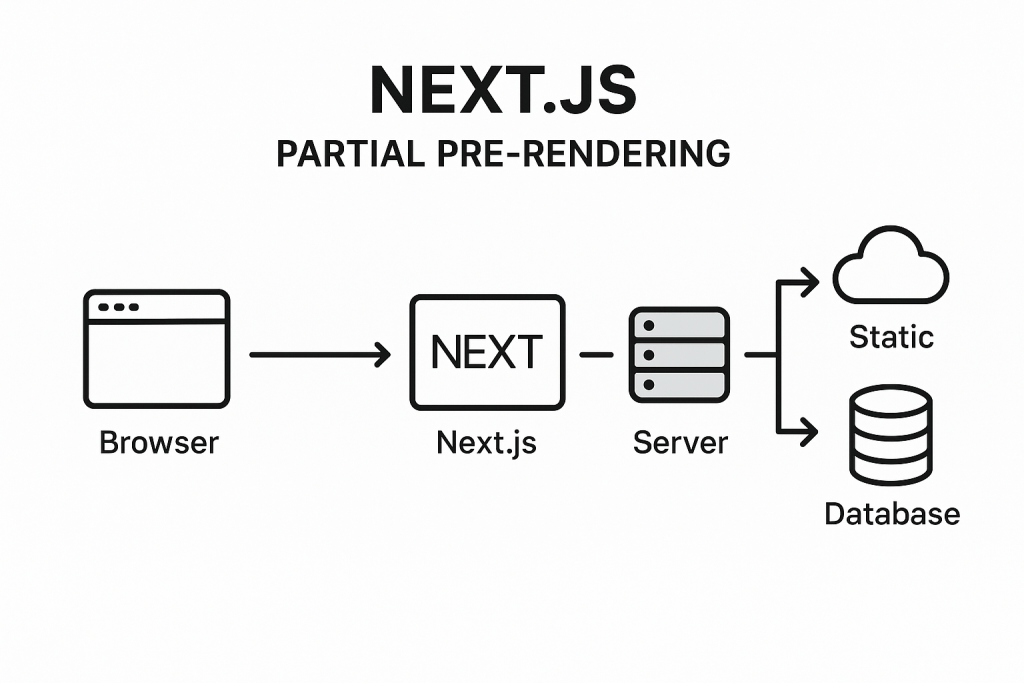
Static routes were more optimized for speed due to the fact that they were rendered at build time, with the option to be served directly from a CDN.
On the other hand, dynamic routes were more flexible, as they were able to have logic to be run server-side for every request; however, this would come at the cost of a higher time-to-first-byte (TTFB) as well as an increased server load due to the higher number of requests made.
Previous approaches that served static content with an empty state and dynamic client-side rendered content were able to offload work from the server; the trade-offs made the client download larger JS bundles, incur hydration delays, and experience waterfall request delays.
This trade-off has historically existed and has been a matter of perception.
Next.js 16.1 changes this. With cache components (and the partial prerendering model it enables), the right question is no longer “Is this route static or dynamic?”
Instead, it becomes, what specific sections of this route execute, when, and how frequently?
This post looks at how this model operates in production and how it compares to static exports.
What Are Cache Components?
In Next.js 16.1, Cache Components is an opt-in feature that modifies how the App Router inspects and processes your component tree.
Next.js no longer considers an entire route as entirely static or dynamic. Now, Next.js inspects each component and decides what can be prerendered and what needs to be postponed to request time.
To use this feature, you will need to add the `cacheComponents` flag to your next config.ts:
// next.config.ts
import type { NextConfig } from 'next'

const nextConfig: NextConfig = {
  cacheComponents: true,
}

export default nextConfig
Note: Cache components are only available with the Node.js runtime. It will not work with runtime = ‘edge’ and will throw errors if you try to use it together.
When you enable cache components, that becomes the default rendering model for all pages of your App Router application.
The result is what is termed “Partial Prerendering” (PPR), and this is the out-of-the-box default.
How Cache Components and PPR Work
The Prerendering Rules
Next.js applies a deterministic set of rules to each component at build time to determine if a component can be prerendered.
Prerendering is an option for components that only include the following:
- Synchronous I/O (e.g., fs.readFileSync)
- Module imports
- Pure computation
Components are ineligible for prerendering when they:
- execute network request (e.g., fetch(), database queries)
- access runtime data such as: cookies(), headers(),searchParams, or params (for non-static routes)
- utilize non-deterministic API calls (i.e.), Math.random(), Date.now(), crypto.randomUUID()
- perform asynchronous file system operations
If Next.js comes across a component that cannot be prerendered, it simply stops and forces you to deal with that component by either wrapping it in a<Suspense> boundary or opting for a use cache directive for caching.
If you don’t do either, you are going to run intouncached data that was accessed outside of the <Suspense> error at build time.
This is the outcome that is designed by the framework. In various ways, it forces the developer to be explicit, as ideally, a developer should specify each cache for the component.
There is a potentially vague situation, and it is extremely infrequent: a fallback to a fully dynamic route.
What Gets Generated at Build Time
There are three things that prerendering creates for each route:
- A static HTML shell: the fully rendered output of all the prerenderable components. This includes the UI of the Suspense fallback for the segments that are deferred, and is streamed on the first request immediately.
- A serialized RSC payload: It is used for client-side navigation so that the server logic doesn’t have to be executed again. This is the output of the React Server Components.
- Deferred request-time segments: Components that were unable to pre-render are streamed by the server when a request hits and are streamed behind their suspense boundaries.
The Three Execution Patterns
Pattern 1: Automatic Prerendering
Under no other circumstances than the use of asynchronous I/O, imports, or any forms of computation are components prefaced in the shell by default. No additional setup is necessary.
Example: Automatic prerendering
// app/page.tsx
import fs from 'node:fs'
export default async function Page() {
  // Synchronous I/O — eligible for prerendering
  const content = fs.readFileSync('./config.json', 'utf-8')
  const parsed = JSON.parse(content)
  return <h1>{parsed.title}</h1>
}
If both the layout and page qualify, the entire route becomes a static shell—functionally equivalent to a static export, but with the App Router’s caching infrastructure still available.
Pattern 2: Deferred Rendering with Suspense
For runtime data components or those that involve network requests, use <Suspense>. The fallback is integrated with the static shell, and the content of the component is streamed when the request is made.
Here is a component that fetches data from a given URL and returns a paragraph with the price of the data retrieved from the URL.
// app/components/price.tsx
export default async function Price() {
  const res = await fetch('https://api.example.com/price')
  const data = await res.json()
  return <p>Current price: {data.price}</p>
}

// app/page.tsx
import { Suspense } from 'react'
import Price from './components/price'

export default function Page() {
  return (
    <>
      <h1>Product</h1>  {/* In the static shell */}
      <Suspense fallback={<p>Loading price…</p>}>
        {/* Fallback is in the static shell; Price streams at request time */}
        <Price />
      </Suspense>
    </>
  )
}
Try to place each <Suspense> boundary right next to the dynamic component. Anything that is outside the <Suspense> boundary will still get rendered through pre-rendering.
Runtime API calls (e.g., cookies(), headers(), searchParams) cannot be cached and will always require a Suspense boundary because they utilize the incoming request:
// app/components/user-preferences.tsx
import { cookies } from 'next/headers'

async function UserPreferences() {
  const theme = (await cookies()).get('theme')?.value
  return <p>Theme: {theme}</p>
}

// app/page.tsx
import { Suspense } from 'react'
import UserPreferences from './components/user-preferences'

export default function Page() {
  return (
    <Suspense fallback={<p>Loading preferences…</p>}>
      <UserPreferences />
    </Suspense>
  )
}Note: You can extract values from runtime APIs and use those values to call a cached function. This allows for partial reuse and does not block prerendering. See the use cache section below.
You also need to defer non-deterministic operations like Math.random() or Date.now(). To do this, use connection() from next/server to indicate this explicitly:
import { connection } from 'next/server'
import { Suspense } from 'react'

async function UniqueContent() {
  await connection() // Explicitly defers to request time
  const value = Math.random()
  return <p>{value}</p>
}

export default function Page() {
  return (
    <Suspense fallback={<p>Loading…</p>}>
      <UniqueContent />
    </Suspense>
  )
}
Pattern 3: Caching Dynamic Data with the use cache
You can use the cache directive to store the results of dynamic components or functions and embed that result into the static HTML shell. This is the most sophisticated pattern the cache components offer.
The cache key is, by default, created via the arguments and closed-over variables, meaning that different values will result in different cache entries. This means that parameterized caching can be achieved without a dynamic route.
While implementing a cache update policy, it makes sense to set a cache update policy every hour in order to avoid costly database calls.
// app/page.tsx

import { cacheLife } from 'next/cache'

export default async function Page() {

  'use cache'

  cacheLife('hours') // Cache revalidates every hour

  const users = await db.query('SELECT * FROM users')

  return (

  <ul>

  {users.map((u) => (

  <li key={u.id}>{u.name}</li>

  ))}

  </ul>

  )
}
cacheLife accepts named profiles (‘seconds,’ ‘minutes,’ ‘hours,’ ‘days,’ ‘weeks,’ or ‘max’) or a custom object:
cacheLife({
  stale: 3600, // Serve cached content for up to 1 hour without revalidating
  revalidate: 7200, // Revalidate in the background after 2 hours
  expire: 86400,  // Hard expiry at 24 hours
})
Using `use cache` with Runtime Data
It is impossible to use the cache directive, `use cache`, and the runtime APIs in the same `scope` way. A common pattern is to read the runtime data within an uncached component, then pass the extracted value to a cached function as an argument.
// app/profile/page.tsx

import { cookies } from 'next/headers'
import { Suspense } from 'react'

export default function Page() {
  return (
    <Suspense fallback={<div>Loading…</div>}>
      <ProfileContent />
    </Suspense>
  )
}

// Reads runtime data — not cached
async function ProfileContent() {
  const sessionId = (await cookies()).get('session')?.value
  return <CachedUserData sessionId={sessionId} />
}

// Receives runtime value as argument — becomes part of the cache key
async function CachedUserData({ sessionId }: { sessionId: string }) {
  'use cache'
  const data = await fetchUserData(sessionId)
  return <div>{data.name}</div>
}
Caching Non-Deterministic Operations
Non-deterministic operations within a use cache scope run once and are shared among all requests until the cache is revalidated:
export default async function Page() {
  'use cache'

  // Runs once at build/revalidation; all users see the same value
  const id = crypto.randomUUID()

  return <p>Session ID: {id}</p>
}
Cache Invalidation with Tags
Use cacheTag to tag the cached data and then selectively invalidate it.
import { cacheTag, revalidateTag } from 'next/cache'

export async function getPosts() {
  'use cache'
  cacheTag('posts')
  return fetch('https://api.example.com/posts').then(r => r.json())
}

// revalidateTag: marks cache as stale; background refresh on next request
export async function createPost(post: FormData) {
  'use server'
  await savePost(post)
  revalidateTag('posts')
}

// To invalidate cart data, tag it, and revalidate the same way
export async function updateCart(itemId: string) {
  'use server'
  await updateCartItem(itemId)
  revalidateTag('cart', 'max')
}
How Cache Layers Participate
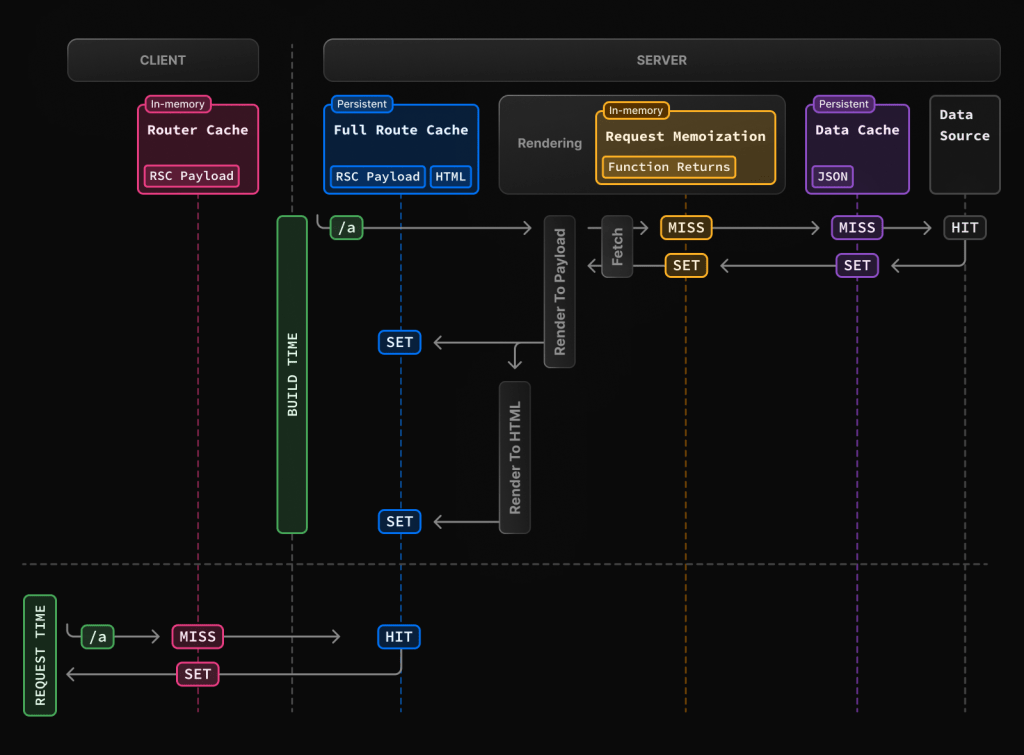
The App Router uses four layers of caching differently for Cache Components (PPR) versus Static Exports:
| Cache Layer | Static Export | Next.js 16.1 (PPR) |
|---|---|---|
| Request Memoization | No | Yes |
| Data Cache (fetch) | No | Yes |
| Full Route Cache | Yes (build-time only) | Yes |
| Client Router Cache | No | Yes |
Static exports produce plain HTML files and carry no RSC payload. The Client Router Cache stores RSC payloads on the client to enable faster App Router navigations—since that infrastructure doesn’t exist in a static export, this layer is unavailable.
All four layers are utilized by PPR routes:
- Request memoization means the same fetch() call will not execute twice in a single request.
- The Data Cache holds results for a single fetch() call across multiple requests, according to the defined cacheLife policy.
- The Full Route Cache holds a prerendered HTML shell + RSC payload
- The Client Router Cache allows for faster transitions on the client side by using the RSC payload.
The primary distinction is that Static Exports are fast because they do not use the caching system at all, while PPR routes are fast because they use the layers of the caching system as intended.
Static Exports: An Overview
Static exports remove the server runtime completely. The configuration is straightforward:
// next.config.js
module.exports = {
  output: 'export'
}
During build time, each HTML file is created for each page. The production deployment consists purely of static files that are served from a CDN or file reposter, which means that the server is gone.
As a consequence:
- At the time of the request, no Server Components are executed
- There is no runtime to maintain a cache, so Cache = no.
- There are no servers for revalidate, cacheTag, revalidateTag, etc.
- No support for cookies(), headers(), or searchParams
- To update content, you need to rebuild and redeploy
Your CDN and host your layer. The App Router’s caching model is completely left out. The cache? Totally your CDN. When dynamic functionality is needed, static exports push that work to the client:
// This is the only option for dynamic data in a static export
'use client'

import { useEffect, useState } from 'react'

export default function Page() {
  const [data, setData] = useState(null)

  useEffect(() => {
    fetch('/api/data').then(res => res.json()).then(setData)
  }, [])

  return <div>{data ? data.value : 'Loading…'}</div>
}
This introduces measurable costs that don’t appear in build-time metrics:
- Increased size of JavaScript bundles
- Increased delay in hydration before meaningful content is displayed
- Client-side data waterfalls (a component renders, then fetches data, and then renders again)
- Reduced SEO effectiveness for content that’s only available after JavaScript is executed
Execution Cost over Time
When considering multiple request latencies, it is easy to miss the overall impact. In production, the accumulating deferral of executed work is what counts the most over time.
Static Exports
The model is straightforward, and the cost is predictable. Each request is the same: a file is served from the CDN—there is no server execution.
The only variable cost is the content’s freshness. Any time the data is updated, a full rebuild and redeploy is required. This becomes a significant operational bottleneck for applications that frequently update: inventory, pricing, user-generated content, etc.
Next.js 16.1 PPR
Cold traffic (when requests start with a deployment or a cache expires): The static shell is served immediately from the Full Route Cache. Deferred segments are executed on the server and streamed. Now, from the cached segments (use cache), the first execution is stored in the Data Cache.
Warm traffic (this is when subsequent requests are made within the cache lifetime): The static shell is reused, and the cached segments are served from the Data Cache, which means there is no server execution. The request cost is almost zero for the server.
// After this segment warms up, the server does no work for 60 seconds
async function Price() {
  'use cache'
  cacheLife('minutes')
  const res = await fetch('https://api.example.com/price')
  const data = await res.json()
  return <p>{data.price}</p>
}
Content updates happen via cache revalidation — no rebuild is required.
revalidateTag(‘posts’) marks entries as stale; the next request triggers a background refresh.
In PPR, the execution cost is bound by the cache policy instead of by the volume of traffic. Under sustained load, the marginal cost per request approaches zero for cached paths.
An Instance of Mixing All 3 Patterns
// app/blog/page.tsx
import { Suspense } from 'react';
import { cookies } from 'next/headers';
import { cacheLife } from 'next/cache';
import Link from 'next/link';

export default function BlogPage() {
  return (
    <>
      {/* Static — prerendered automatically, no configuration needed */}
      <header>
        <h1>Blog</h1>
        <nav>
          <Link href="/">Home</Link> | <Link href="/about">About</Link>
        </nav>
      </header>

      {/* Cached dynamic content — fetched once, included in static shell */}
      <BlogPosts />

      {/* Runtime dynamic content — streams at request time */}
      <Suspense fallback={<p>Loading preferences…</p>}>
        <UserPreferences />
      </Suspense>
    </>
  );
}

async function BlogPosts() {
  'use cache';
  cacheLife('hours');
  const res = await fetch('https://api.example.com/posts');
  const posts = await res.json();
  return (
    <section>
      <h2>Latest Posts</h2>
      <ul>
        {posts.slice(0, 5).map((post: any) => (
          <li key={post.id}>
            <strong>{post.title}</strong> — {post.author}
          </li>
        ))}
      </ul>
    </section>
  );
}

async function UserPreferences() {
  // Requires request context — cannot be prerendered or cached
  const theme = (await cookies()).get('theme')?.value ?? 'light';
  return <aside>Theme: {theme}</aside>;
}
At build time: the header and blog posts (via use cache) are embedded in the static shell. The suspense fallback (<p>Loading preferences…</p>) is also in the static shell.
At request time: UserPreferences begins streaming after cookies are read. If the blog post cache is warm, the server does no further work for that segment.
Moving Away from Route Segment Configs
Cache components replace some App Router patterns. Here are the adjustments:
- dynamic = “force-dynamic” — This is now obsolete. All pages implement dynamic segments through Suspense. Eliminate it.
- dynamic = “force-static”—This is replaced by use cache + cacheLife(“max”) at the data access locations.
- revalidate—This is replaced by cacheLife() inside a use cache:
// Before
export const revalidate = 3600

// After
import { cacheLife } from 'next/cache'

export default async function Page() {
  'use cache'
  cacheLife('hours')
  // ...
}- fetchCache — No longer required. All calls to fetch() that are within a use cache are automatically stored.
- runtime = ‘edge’ — This is incompatible with cache components and needs to be removed.
Navigation Behavior: Activity Component
When `cacheComponents: true` is enabled, Next.js utilizes the Activity component from React for client-side navigation. Instead of unmounting the previous route, the component sets the Activity mode to “hidden.” This has the following implications:
Component state is retained across route changes.
When navigating back, the state of the previous route is restored, including the values of form inputs, scroll position, collapsed/expanded sections, etc.
Effects are cleaned up when a route is hidden and re-run when it becomes visible — but because component state is preserved throughout, this is distinct from a full remount. The component does not reset to its initial state.
In order to manage memory, Next.js employs heuristics to remove older routes from the hidden state.
This is a considerable behavioral difference from standard App Router navigation and is something that will need to be considered when handling side effects in your components.
Production Decision Guide
Choose static exports when:
- Content is perpetually identical across multiple deployments (e.g., documentation and marketing pages that require a manual update)
- You want a zero-server infrastructure solution that has direct output to a CDN, S3 bucket, etc.
- You can go without dynamic data, personalization, or behavior at runtime
- Build times are acceptable for your update frequency.
Choose Next.js 16.1 PPR (Cache Components) when:
- Certain content is static, and some is dynamic for the same route
- You want data to be fresh without having to do full site rebuilds (e.g., pricing, inventory, feeds)
- You want personalized content plus some content that can be shared (i.e., cached)
- Your SEO strategy relies on having some server-rendered content that is dynamic
- You want to reduce server costs due to execution at scale in conjunction with cache reuse
The practical boundary: If a static export is reliant on useEffect + fetch to render something useful, then the client-side costs are negating any benefits to static delivery.
PPR with the use cache should be better in terms of perceived performance and operational overhead.
Conclusion
As for factors concerning PPR in Next.js 16.1 and static export, we can summarize them in the table below.
| Capability | Static Export | Next.js 16.1 PPR |
|---|---|---|
| Build-time rendering | ✅ | ✅ |
| Request-time rendering | ❌ | ✅ (via Suspense) |
| Data freshness without rebuild | ❌ | ✅ (via revalidateTag) |
| Personalized server-rendered content | ❌ | ✅ |
| SEO with dynamic data | ❌ | ✅ |
| App Router cache integration | ❌ | ✅ |
| Zero server infrastructure | ✅ | ❌ |
| Edge Runtime support | ✅ | ❌ |
| Client-side JS is required for dynamic data | ✅ (always) | Only if explicitly “use client” |
With Cache Components, there are shifts made with regard to the performance model from per-request execution cost to cache-hit execution cost.
This newer, more simplified model (for the majority of application types) is more efficient than traditional dynamic rendering and static exports for applications with a mix of stable and dynamic content.
Applicable content in this sense may include content that fits within the seven factors for cache components.